Related Articles

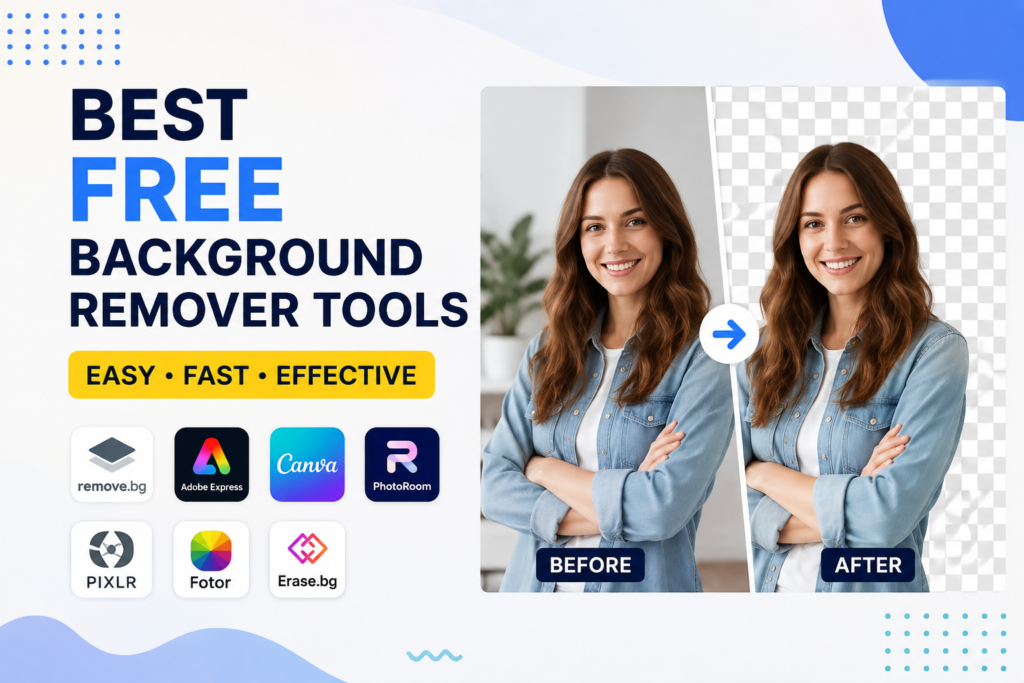
If you have ever edited photos for a blog, online store, social media, or YouTube thumbnail, then you already know how important it is to remove the background from an image. A clean background makes any picture look more professional and attractive. The good news is that you no longer need expensive software or advanced editing skills to do this. Today, there are many free background remover tools that can complete the job in just a few seconds.
I have tried many of these tools over the past few years while creating content, editing product photos, and designing graphics. Some work surprisingly well, while others struggle with complex images. In this article, I want to share my personal experience with the best free background remover tools that I think are worth using. My goal is to help you choose the right one without wasting your time testing dozens of different websites.
Why Background Removal Is Important
Before talking about the tools, I think it is important to understand why background removal matters. A photo with a clean or transparent background looks much more professional. Whether you are selling products online, designing a logo, creating social media posts, or making YouTube thumbnails, removing unnecessary objects from the background helps the main subject stand out.
I have noticed that simple images usually get more attention because they look clean and focused. This is one reason why many brands and content creators spend time editing their images before publishing them.
What Makes a Good Background Remover
In my opinion, a good background remover should not only be free but also easy to use. Nobody wants to spend hours learning complicated software just to edit one image.
Here are a few things I always look for.
Fast processing speed
Good edge detection around hair and objects
High quality output
Support for transparent PNG files
No watermark on the final image
Easy to use interface
If a tool offers these features without asking for payment, I consider it worth recommending.
Remove.bg
Whenever someone asks me about background removal, the first website that comes to my mind is Remove.bg. It is probably the most popular tool available today.
The process is incredibly simple. You upload your photo and within a few seconds the background disappears automatically. I have used it for portraits, product images, and even pet photos. Most of the time the results are very impressive.
The free version is perfect for quick editing, although the download quality has some limitations. Still, if you only need images for social media or blog posts, it works really well.
Adobe Express Background Remover
Adobe is already famous for professional editing software, so I was curious to try its free online background remover.
The thing I like most about Adobe Express is the clean interface. Everything feels simple and modern. The AI does a great job identifying the subject and separating it from the background.
After removing the background, I can continue editing the image directly inside Adobe Express. I can change colors, add text, or create social media graphics without downloading the image first.
This makes it a good option for people who want an all in one editing solution.
Canva Background Remover
Canva is one of my favorite design platforms. Although the background remover is mainly available in the premium version, Canva often offers free access during special promotions or educational accounts.
What I like about Canva is that after removing the background, I can immediately design banners, Instagram posts, YouTube thumbnails, presentations, and business graphics.
Instead of switching between multiple websites, everything happens in one place.
PhotoRoom
PhotoRoom has become very popular among online sellers and ecommerce businesses.
I personally find it useful when editing product images. The AI removes the background accurately and allows me to replace it with white backgrounds, colored backgrounds, or custom designs.
If you sell products on marketplaces or your own online store, this tool can save a lot of editing time.
The mobile application is also excellent for editing photos directly from your smartphone.
Pixlr Background Remover
Pixlr has always been one of my favorite online photo editors, and its background remover is equally impressive.
What makes Pixlr different is that after removing the background, I can continue making advanced edits using its built in editor.
For someone who wants more control over image editing without installing Photoshop, Pixlr is definitely worth trying.
Fotor
Fotor is another free tool that I often recommend to beginners.
The interface is clean and everything works smoothly. Uploading an image takes only a few seconds, and the AI usually identifies the main subject accurately.
Besides background removal, Fotor also offers photo enhancement, filters, beauty tools, and graphic design features.
If you want multiple editing options on one platform, Fotor is a solid choice.
Erase.bg
Erase.bg is another website that surprised me with its performance.
It works especially well for portraits and simple product photos. The AI quickly removes the background while keeping the edges smooth.
I also appreciate that the website loads quickly and does not confuse users with unnecessary options.
Sometimes simple tools are the best because they focus on doing one job really well.
Cleanup Pictures
Although Cleanup Pictures is mainly known for removing unwanted objects, I often combine it with background removal tools.
After removing the background using another website, I use Cleanup Pictures to erase small imperfections or unwanted shadows.
This combination helps create much cleaner images without spending money on professional software.
Which Tool Gives the Best Results
After trying many different websites, I think every tool has its own strengths.
If I need the fastest results, I usually choose Remove.bg.
If I want additional graphic design features, Adobe Express or Canva becomes my first choice.
For ecommerce images, PhotoRoom performs exceptionally well.
If I need more editing control, Pixlr gives me better flexibility.
Instead of saying one tool is perfect for every situation, I believe choosing the right tool depends on your specific needs.
Tips for Better Background Removal
Even the best AI tools work better when you upload a good quality image.
I always try to follow these simple tips.
Use high resolution photos.
Make sure the subject is clearly visible.
Avoid blurry images.
Choose pictures with good lighting.
Keep enough space around the subject.
Following these small steps usually improves the final result without requiring additional editing.
Are Free Background Removers Safe
Many people worry about uploading personal images to online websites. I think this is a reasonable concern.
Before using any online editor, I recommend checking its privacy policy. If the image contains sensitive information or personal documents, it is better to avoid uploading it to unknown websites.
For regular product photos, profile pictures, or blog images, well known platforms are generally safer than random websites with no reputation.
Can Free Tools Replace Photoshop
This is a question I hear quite often.
In my experience, free AI background remover tools are good enough for most everyday tasks. If you only need transparent backgrounds, social media graphics, product images, or blog pictures, you probably do not need Photoshop.
However, professional graphic designers who require pixel level editing, advanced masking, or complex photo manipulation will still benefit from professional software.
For the average user, free tools are more than enough.
Final Thoughts
Technology has made photo editing much easier than it was a few years ago. Today, anyone can remove an image background within seconds without learning complicated software or spending money on expensive subscriptions.
After testing many free background remover tools, I believe that Remove.bg, Adobe Express, PhotoRoom, Pixlr, Fotor, Canva, and Erase.bg are among the best options available. Each one has its own strengths, and choosing the right one depends on your editing needs.
Personally, I enjoy using different tools depending on the project I am working on. Sometimes I only need a transparent background, while other times I want to continue editing the image with text, effects, or graphic elements. Having multiple free options gives me the flexibility to work faster and achieve professional looking results.
If you are just getting started, I recommend trying a few of these tools yourself. Within a short time, you will discover which one fits your workflow best. The best part is that most of them are free, beginner friendly, and capable of producing impressive results without requiring any technical skills.