Related Articles

When I started learning about SEO, backlinks were one of the areas that seemed confusing to me. I knew that backlinks could help a website gain authority and visibility, but I did not fully understand how to check them or how to know whether a backlink was actually useful. After spending more time learning SEO, I realized that a backlink checker tool can make this process much easier.
A backlink checker helps me understand which websites are linking to my website, which pages are receiving links, what anchor text is being used, and how my backlink profile compares with other websites. These insights can be useful when creating an SEO strategy.
In this article, I will explain what a backlink checker tool is, why backlinks matter, what features I look for in a good tool, and how beginners can use backlink analysis to improve their website SEO.
What Is a Backlink Checker Tool?
A backlink checker tool is an SEO tool that helps you find and analyze links pointing to a website from other websites. These links are called backlinks.
For example, if another website publishes an article and links to one of my blog posts, that link becomes a backlink for my website.
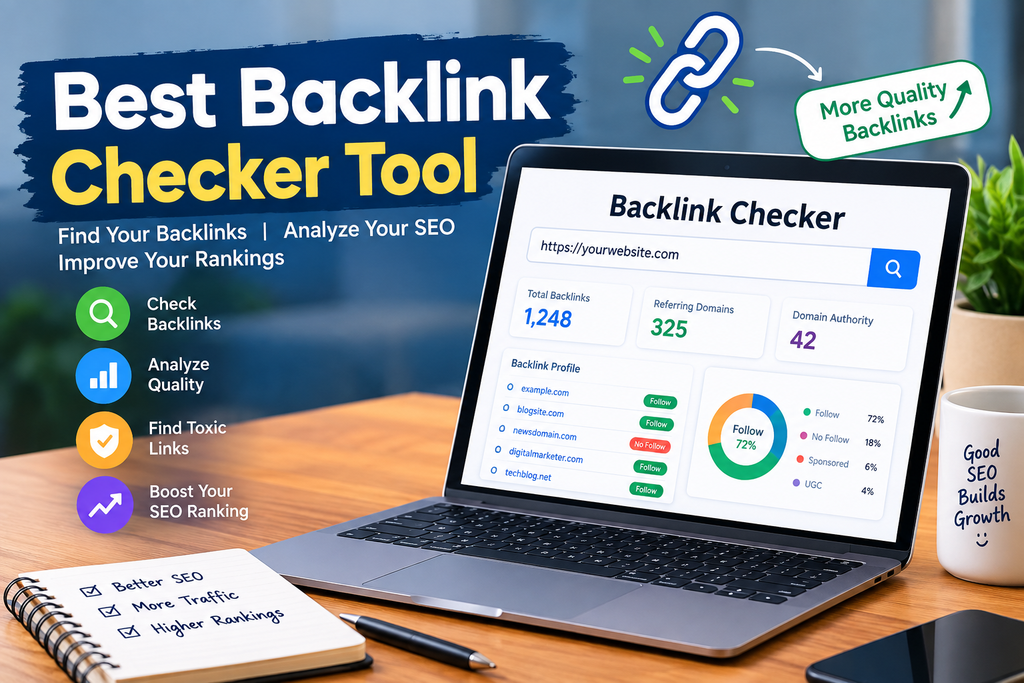
A backlink checker can show information such as the number of backlinks, referring domains, linking pages, anchor text, link attributes, and sometimes useful authority metrics.
I find these tools especially helpful because manually finding backlinks would be extremely difficult. A good tool collects this information in one place and presents it in a way that is easier to understand.
Why Are Backlinks Important for SEO?
Backlinks are an important part of SEO because they can help search engines discover pages and understand relationships between websites.
However, I do not believe that simply getting thousands of backlinks should be the main goal. The quality and relevance of backlinks are also important.
A link from a relevant and trustworthy website can be more meaningful than many links from unrelated or low quality websites.
For example, if I have a website about fitness and another relevant website references one of my useful fitness articles, that backlink can make sense from both a user and SEO perspective.
This is why I prefer to focus on building a natural backlink profile rather than chasing backlink numbers alone.
What Makes the Best Backlink Checker Tool?
There are many backlink checker tools available, and each one provides different features. In my opinion, the best backlink checker tool should make backlink data easy to understand while providing enough information for useful SEO decisions.
Here are some features I consider important.
1. Backlink Discovery
The first thing I expect from a backlink checker is the ability to discover backlinks.
The tool should show which websites are linking to my domain and, when possible, which specific pages contain those links.
This gives me a better understanding of where my website is receiving attention.
2. Referring Domains
I also like to check referring domains.
A referring domain is a website that links to my website. Looking at referring domains can provide a better picture of backlink diversity than looking only at the total number of links.
For example, one website could potentially create many links to another website. Therefore, looking at both backlinks and referring domains gives a more complete picture.
3. Anchor Text Analysis
Anchor text is another useful part of backlink analysis.
Anchor text is the clickable text used for a link. By checking anchor text, I can understand how other websites are describing or referencing my content.
A backlink checker that provides anchor text information can help identify patterns and unusual link activity.
4. Link Attributes
A useful backlink checker should provide information about link attributes such as follow, nofollow, sponsored, and user generated content links when the data is available.
These attributes can help me understand the different types of links within my backlink profile.
I do not look at one link attribute in isolation. Instead, I consider the overall backlink profile and the context of each link.
5. New and Lost Backlinks
One feature I find particularly useful is tracking new and lost backlinks.
New backlinks can show that other websites are discovering my content. Lost backlinks can help me identify situations where a website previously linked to my page but no longer does.
If I notice an important backlink has disappeared, I can investigate what happened. The page may have been removed, the website may have changed its content, or the link may simply have been updated.
How I Use a Backlink Checker Tool
Using a backlink checker is usually simple.
First, I enter the website domain or a specific page into the tool. The tool then processes its backlink database and displays the available information.
I usually start by looking at the total backlinks and referring domains. After that, I examine individual links to understand where they are coming from.
I also check the pages receiving the most backlinks. This can show me which types of content other websites find useful.
For example, if one of my detailed guides receives significantly more backlinks than regular blog posts, I may create more content around similar topics.
Backlink Checker for Competitor Research
One of the most useful applications of a backlink checker tool is competitor research.
I can enter a competing website and examine its backlink profile. This does not mean copying its links. Instead, I use the information to understand its content promotion strategy.
I may discover that competitors receive backlinks from industry blogs, resource pages, directories, educational websites, or other relevant sources.
This information can help me identify websites and content types that are already interested in my topic.
I can then focus on creating better and more useful content that naturally deserves references.
Free Backlink Checker Tools
For beginners, free backlink checker tools can be a good starting point.
Free versions usually provide limited data compared with premium SEO platforms, but they can still help someone understand the basics of backlink analysis.
If I am working on a small website, I would first use a free backlink checker to understand the website’s general backlink profile.
As the website grows, I may need more detailed data, historical information, competitor analysis, and larger backlink databases.
The important thing is not to choose a tool simply because it has the longest list of features. I would choose a tool based on the information I actually need.
Backlink Checker Tools for Small Websites
Small website owners often do not need extremely complicated SEO software.
For a small blog or new website, I would focus on a few important metrics:
Backlinks
Referring domains
Linking pages
Anchor text
New backlinks
Lost backlinks
Competitor backlinks
These details can provide enough information to understand the basic health and development of a backlink profile.
As a website becomes larger, advanced features can become more valuable.
How to Find High Quality Backlinks
A backlink checker can help me discover links, but it does not automatically build high quality backlinks.
I believe the best approach is to create content that people genuinely want to reference.
For example, original research, useful guides, statistics, tutorials, helpful resources, and detailed explanations can attract attention from other websites.
Another method is creating relationships with websites in the same industry. Guest contributions, expert resources, useful collaborations, and genuine outreach can sometimes create opportunities for relevant backlinks.
The focus should always be on usefulness and relevance.
Things I Avoid When Building Backlinks
I avoid treating backlinks as a numbers game.
Buying large quantities of questionable backlinks can create unnecessary SEO risks. I also avoid spammy link building methods and irrelevant links that provide little value to visitors.
Instead, I prefer backlinks that make sense in the context of the content.
If a website links to my article because it genuinely helps its readers, that is much more meaningful than a random link placed only to increase backlink numbers.
Backlink Quality vs Backlink Quantity
One common mistake I see beginners make is focusing only on the number of backlinks.
Suppose one website has 10,000 backlinks while another has 500 backlinks. It would be incorrect to automatically assume that the first website has the stronger SEO profile.
The quality, relevance, diversity, and context of links can all matter.
This is why I use a backlink checker to examine the details behind the numbers.
A smaller website with useful content and relevant links can have a very different backlink profile from a website that has accumulated a large number of low value links.
Can a Backlink Checker Improve Website SEO?
A backlink checker does not directly improve SEO. Instead, it provides information that can help me make better SEO decisions.
For example, I can use backlink data to identify successful content, discover potential content opportunities, monitor changes, and understand competitor strategies.
The actual improvement comes from what I do with that information.
I can use the insights to create better content, improve existing pages, build genuine relationships, and develop a more organized SEO strategy.
My Approach to Choosing the Best Backlink Checker Tool
When I choose a backlink checker, I consider ease of use first.
I want the interface to be simple enough that I can quickly find important information without spending a lot of time learning complicated features.
I also consider the size and freshness of the backlink database, competitor research features, historical data, reporting options, and whether the tool provides enough information in its free version.
For beginners, a simple tool with clear information can be more useful than an advanced platform filled with features that are rarely used.
Final Thoughts
In my experience, a backlink checker tool is one of the most useful tools for understanding off page SEO. It can show where backlinks are coming from, which pages attract the most links, how competitors are building their backlink profiles, and how a website’s link profile changes over time.
The best backlink checker tool is not necessarily the one with the most features. For me, the better choice is the tool that provides reliable backlink information in a simple and understandable way.
If you are just starting SEO, begin with the basics. Check your backlinks, review referring domains, understand anchor text, monitor new and lost links, and study relevant competitor websites.
Most importantly, focus on creating useful content and earning relevant backlinks naturally. A backlink checker should be used as a research and monitoring tool rather than as a shortcut to SEO success.
With consistent content creation, careful backlink analysis, and a long term SEO approach, you can better understand your website’s link profile and make more informed decisions about your SEO strategy.