Related Articles



When I started learning about freelancing, I realized that getting a project is only one part of working professionally. The other important part is knowing how to manage the business side of freelancing. One thing every freelancer eventually needs is a professional freelance invoice.
A freelance invoice is a document that tells your client what work you completed, how much they owe you, when the payment is due, and how they can pay you. It may look simple, but a well prepared invoice can make you look more professional and can also help you keep your freelance income organized.
In my opinion, creating a professional freelance invoice does not need to be complicated. You just need to include the right information, keep the design clean, and make sure the payment details are easy to understand.
What Is a Freelance Invoice?
A freelance invoice is a payment request sent by a freelancer to a client after completing work or reaching an agreed payment milestone. Depending on the project, you may send an invoice after the entire project is finished or send several invoices throughout the project.
For example, if you are a freelance writer, you can create an invoice showing the articles you completed, the agreed rate, the total amount, and the payment deadline.
A freelance invoice is different from a simple message asking for payment. It is a formal business document that provides a clear record of the transaction.
Why a Professional Freelance Invoice Matters
I believe a professional invoice can make a noticeable difference in how clients see you. Even if you are a beginner, a clear invoice can make your freelance business look organized and trustworthy.
A good invoice also reduces confusion. The client can immediately see what they are paying for and how much they need to pay.
Another important benefit is record keeping. Keeping copies of your invoices can help you track your earnings, outstanding payments, completed projects, and business expenses.
If you work with multiple clients, invoices can become especially useful because you have a record of each payment request.
Include Your Business Information
The first section of your freelance invoice should include your information.
You can include your full name or freelance business name, email address, phone number if appropriate, and other professional contact information.
If you have a website or professional portfolio, you can also include it.
For example:
Your Name
Freelance Content Writer
yourname@example.com
www.example.com
You do not need to make this section complicated. The main goal is to make it easy for your client to identify who sent the invoice.
If you operate under a registered business name, use the appropriate business information required in your location.
Add the Client Information
Your invoice should also clearly identify the client.
Include the client’s name and company name if applicable. You can also include their email address or business address when necessary.
Before sending the invoice, I recommend checking the spelling of the client’s name and company name. Small mistakes can make a document look less professional.
For larger companies, it is also useful to ask whether they have a specific billing department or invoice submission process.
Give Every Invoice a Unique Number
An invoice number is one of the easiest ways to organize your invoices.
You can use a simple system such as:
Invoice 001
Invoice 002
Invoice 003
You can also use a year based system such as:
INV 2026 001
INV 2026 002
The exact format is your choice. What matters is that you use a consistent system.
I personally recommend keeping invoice numbers sequential because it makes your records easier to manage.
Add the Invoice Date and Due Date
Every professional freelance invoice should have an invoice date.
You should also include the payment due date.
For example, if you send an invoice on August 21 and give the client seven days to pay, you can clearly write the due date as August 28.
Your payment terms should ideally be agreed upon before you start the project. This prevents uncomfortable conversations later.
Some freelancers use payment terms such as payment due within seven days, fourteen days, or thirty days. Your choice may depend on the client and the type of project.
Clearly Describe Your Freelance Services
One of the most important parts of a freelance invoice is the description of your work.
Do not simply write something vague such as “freelance work.” Give the client enough information to understand what they are paying for.
For example, a content writer could write:
Website article writing
Three SEO optimized articles
Keyword research and basic content formatting
A graphic designer could write:
Logo design
Two initial concepts
One final logo with revisions
A web developer could write:
Website development
Homepage design and development
Contact form integration
The description should match the work you actually completed.
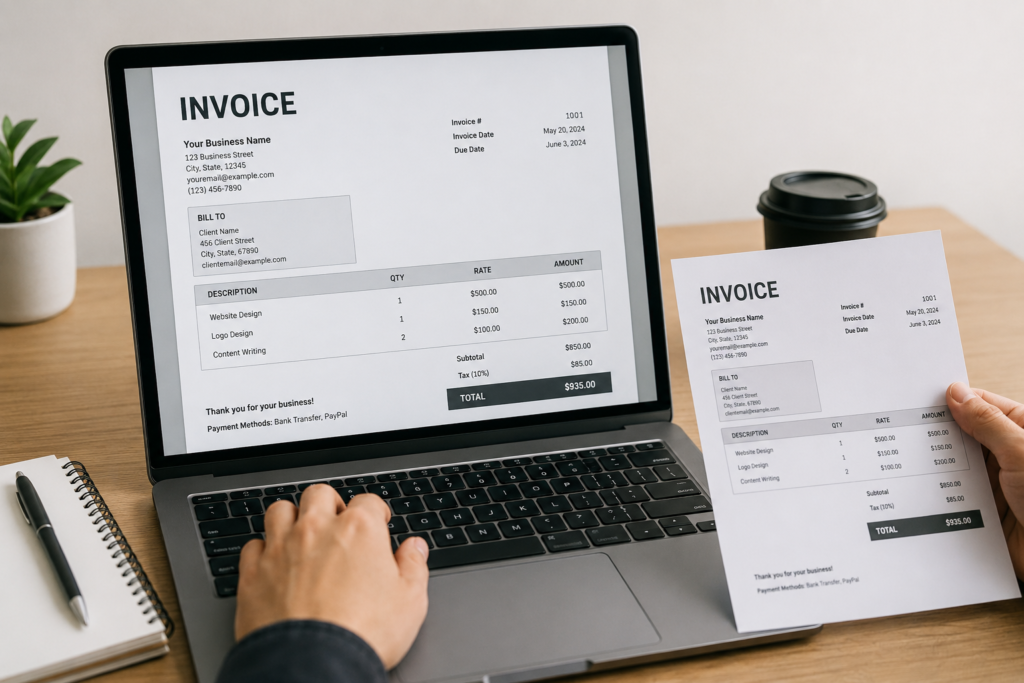
Show Quantity, Rate, and Amount
If you charge per article, hour, project, or service, make the calculation clear.
A simple invoice table can include:
| Service | Quantity | Rate | Amount |
|---|---|---|---|
| SEO article writing | 3 | $50 | $150 |
| Keyword research | 1 | $30 | $30 |
| Total | $180 |
This format makes the invoice easy to understand.
If you charge a fixed project price, you can simply list the project and agreed amount.
The most important thing is that the final amount should be obvious.
Calculate the Total Carefully
Before sending a freelance invoice, always check the calculations.
Your invoice may include a subtotal, taxes if applicable, discounts if agreed, and the final amount due.
For example:
Subtotal: $500
Discount: $50
Total Due: $450
If you are required to charge taxes in your location, make sure you follow the applicable rules.
For freelancers working internationally, it is also important to clearly state the currency. Do not assume that the client will understand whether an amount is in USD, EUR, GBP, or another currency.
Include Payment Methods
A professional freelance invoice should tell the client how to pay you.
Depending on your location and the client, you may accept bank transfer, PayPal, Payoneer, Wise, or another payment method.
Only include payment methods that you actually use and that are suitable for the client.
For bank payments, provide the necessary details carefully. If you work internationally, confirm what information the client needs for an international transfer.
It is also a good idea to double check payment details before sending the invoice.
Add Your Payment Terms
Payment terms explain when and how the client should pay.
You can include a short statement such as:
“Payment is due within 14 days of the invoice date.”
If you have a late payment policy, you can mention it clearly. However, I recommend discussing important payment terms with the client before the project begins rather than surprising them on the invoice.
This is especially important for new clients.
Keep the Invoice Design Simple
A professional freelance invoice does not need complicated graphics.
In my opinion, simple invoices often look more professional than heavily decorated ones.
Use readable fonts, clear headings, enough spacing, and a logical structure.
Your client should be able to open the invoice and understand the amount due within a few seconds.
You can add your logo if you have one, but it is not necessary. The important thing is clarity.
Choose the Right Invoice Format
PDF is usually one of the most convenient formats for sending a freelance invoice because it keeps the layout consistent across different devices.
You can create an invoice using Word, Google Docs, Excel, Google Sheets, or dedicated invoicing software.
Once you have created your invoice, save a copy for your records and send the final version to the client.
I recommend avoiding editable formats when sending the final invoice unless the client specifically requests one.
Add a Short Thank You Note
A short professional message at the bottom of your invoice can make the document feel more personal.
For example:
“Thank you for working with me. I appreciate your business and look forward to working with you again.”
There is no need to write a long message. A simple and polite closing is enough.
Review Your Invoice Before Sending It
This is a step I would never skip.
Before sending your freelance invoice, check the client’s name, invoice number, date, due date, service description, quantity, rate, total amount, currency, and payment details.
Also check your spelling and grammar.
A small mistake in a payment amount or bank detail can create unnecessary problems.
Take a minute to review everything before clicking send.
Keep Copies of Your Invoices
Do not delete your invoices after receiving payment.
Keep organized copies of all invoices you send.
You can create folders based on years or clients. For example:
Freelance Invoices
2026
Client A
Client B
Client C
You can also maintain a simple spreadsheet showing the invoice number, client, amount, date sent, due date, and payment status.
This makes it much easier to see which invoices have been paid and which are still outstanding.
What to Do When a Client Does Not Pay
Sometimes a client may forget to pay an invoice. This does not always mean they are trying to avoid payment.
If the due date passes, send a polite reminder.
You can write:
“Hello, I wanted to follow up regarding invoice INV 2026 004, which was due on August 28. Please let me know if you need any additional information from me. Thank you.”
Keep the message professional and avoid emotional language.
If a client repeatedly fails to pay, review your original agreement and consider using clearer payment terms for future projects.
Common Freelance Invoice Mistakes
There are several mistakes freelancers should try to avoid.
One common mistake is not including a due date. Without a due date, the client may not know when payment is expected.
Another mistake is using unclear service descriptions. The client should understand exactly what the invoice represents.
Some freelancers also forget to include the currency, especially when working with international clients.
Incorrect calculations are another problem. Always check your totals before sending an invoice.
Finally, avoid making your invoice unnecessarily complicated. Your goal is to communicate payment information clearly.
Final Thoughts
Creating a professional freelance invoice is a basic skill that every freelancer should learn. You do not need expensive software or an advanced accounting background to get started.
A good freelance invoice should clearly show who is sending the invoice, who is being billed, what services were provided, how much they cost, when payment is due, and how the client can pay.
From my point of view, the best invoice is one that looks professional but remains simple. When your invoices are consistent and organized, you create a better experience for your clients and make it easier to manage your own freelance business.
If you are just starting freelancing, create one professional invoice template that you can reuse for future projects. Update the client information, invoice number, services, amounts, dates, and payment details each time.
This small habit can make your freelance work feel much more like a real business and can help you build a more organized and professional relationship with your clients.