Related Articles
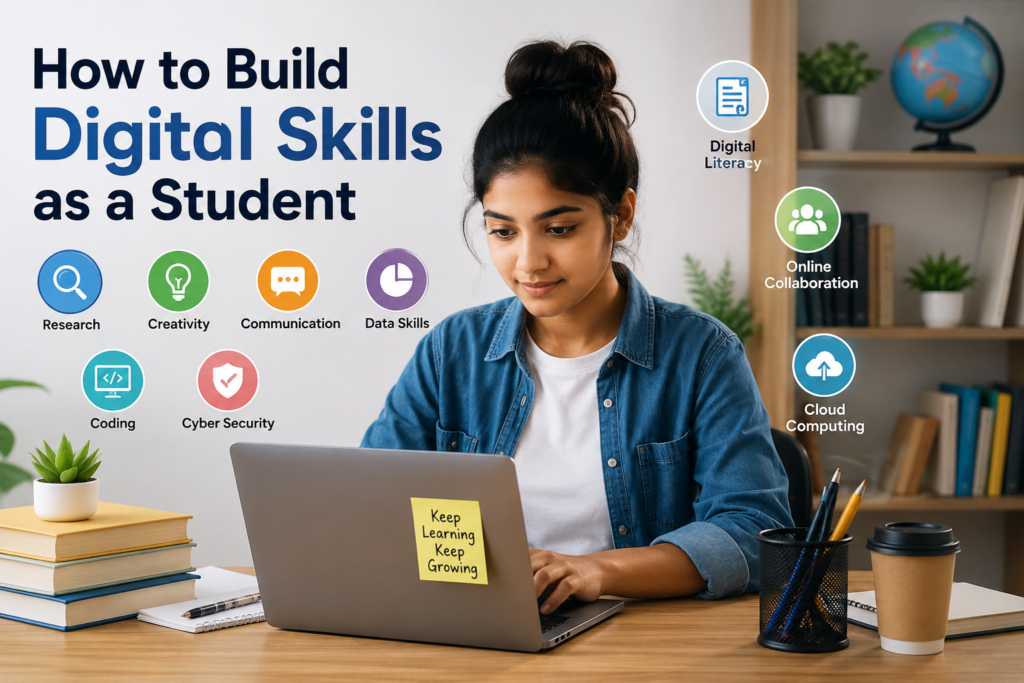
In my opinion, digital skills have become one of the most important parts of student life. Education is no longer limited to books, notebooks, classrooms, and traditional assignments. Today, students use computers, smartphones, online platforms, digital libraries, presentation software, communication tools, and many other technologies almost every day. Because of this, learning how to use technology effectively can make studying easier and can also prepare students for future careers.
I believe that building digital skills does not mean becoming an expert in every software program or learning complicated coding languages. It means understanding how to use digital tools confidently, responsibly, and productively. A student who develops strong digital skills can research information more effectively, communicate better, organize academic work, and create useful projects.
What Are Digital Skills?
Digital skills are the abilities needed to use digital devices, software, websites, online platforms, and other technologies effectively. These skills can include basic computer knowledge, online research, document creation, presentations, communication, data management, cybersecurity, digital creativity, and problem solving.
For students, digital skills are especially useful because they support almost every part of academic life. Whether I am preparing an assignment, attending an online class, creating a presentation, searching for reliable information, or communicating with classmates, digital knowledge can make the process faster and more organized.
The good thing is that digital skills can be developed gradually. Students do not need to learn everything at once. Starting with basic skills and practicing regularly can lead to significant improvement over time.
Start With Basic Computer Skills
The first step in building digital skills as a student is to understand basic computer operations. Students should know how to create folders, organize files, rename documents, install trusted applications, use keyboard shortcuts, manage downloads, and back up important work.
These may seem like simple skills, but they can save a lot of time. I have found that good file organization makes academic work much easier. Instead of searching through hundreds of random files, students can create folders for different subjects and semesters.
For example, a student can create separate folders for English, Mathematics, Science, and Computer Studies. Inside each folder, assignments, notes, presentations, and research materials can be stored separately.
Learning basic troubleshooting is also helpful. Understanding how to check an internet connection, restart an application, update software, or identify a simple technical problem can make students more independent.
Improve Online Research Skills
Online research is one of the most valuable digital skills for students. The internet contains an enormous amount of information, but not everything available online is accurate.
Students should learn how to search using specific keywords instead of typing very general questions. They should also compare information from different reliable sources before using it in an academic project.
Another important skill is checking the credibility of a source. I believe students should ask questions such as who published the information, when it was published, whether evidence is provided, and whether the information is supported by trustworthy references.
Learning how to distinguish reliable information from misleading content is becoming increasingly important. Strong research skills can improve assignments, presentations, projects, and academic discussions.
Learn Document and Presentation Tools
Every student should become comfortable with common productivity tools. Word processing software is useful for writing assignments, reports, essays, and research papers. Spreadsheet tools can help students organize information, perform calculations, and create simple charts. Presentation software can be used to explain ideas in a clear and visual way.
Students do not need to learn every advanced feature immediately. I recommend starting with the functions that are used most often.
For documents, learn how to format headings, create lists, insert tables, add page numbers, and organize paragraphs. For presentations, learn how to create clean slides, use readable fonts, add useful images, and present information logically.
For spreadsheets, students should understand basic formulas, sorting, filtering, and simple charts. These skills can become valuable later in university and professional environments.
Develop Digital Communication Skills
Communication is another important part of digital literacy. Students regularly communicate through email, messaging applications, learning platforms, video meetings, and online discussion forums.
Writing a professional email is a useful skill that every student should develop. An email to a teacher, professor, employer, or university administrator should be clear, respectful, and properly organized.
Students should also learn how to communicate professionally in online meetings. Joining meetings on time, keeping the microphone muted when necessary, listening carefully, and participating respectfully can create a positive impression.
In my view, digital communication is not only about knowing how to use an application. It is about understanding how to communicate appropriately through technology.
Learn Basic Data Skills
Data skills are becoming useful in many areas of education and employment. Even students who are not studying computer science can benefit from understanding basic data concepts.
Students can begin by learning how to organize information in spreadsheets. They can practice entering data, sorting information, calculating totals, creating percentages, and presenting results through simple charts.
For example, a student could create a spreadsheet to track study hours, assignment deadlines, grades, or monthly expenses. This type of practice can make data skills easier to understand because the student is working with information that has practical value.
Over time, students who become comfortable with data can explore more advanced areas such as data analysis, visualization, and statistics.
Explore Coding and Technology
Coding is not necessary for every student, but I believe learning basic programming concepts can improve problem solving and logical thinking.
Students can begin with beginner friendly programming languages or visual coding platforms. The goal at the beginning should not be to become a professional programmer. Instead, students can focus on understanding concepts such as variables, conditions, loops, functions, and logical thinking.
Even a basic understanding of coding can help students understand how websites, applications, and digital systems work.
Students interested in technology can eventually explore web development, mobile applications, software development, artificial intelligence, or data science.
Practice Digital Creativity
Digital skills are not limited to technical tasks. Creativity is also an important part of modern digital learning.
Students can develop skills in graphic design, video editing, photography, digital presentations, animation, or content creation. These abilities can make academic projects more engaging and can also become useful career skills.
For example, a student studying history could create an educational presentation with timelines and visuals. A business student could design a simple promotional presentation. A science student could create an informative video explaining a difficult concept.
The important thing is to practice creating something rather than only consuming digital content.
Learn About Cybersecurity
Digital skills should also include basic cybersecurity knowledge. Students use online accounts, email addresses, cloud storage, social media, and educational platforms, so protecting personal information is extremely important.
Students should use strong and unique passwords for important accounts. Two factor authentication should be enabled whenever it is available. Students should also be careful when clicking unfamiliar links or downloading unknown files.
I believe students should develop the habit of checking website addresses before entering sensitive information. They should also avoid sharing passwords with others.
Basic cybersecurity knowledge can prevent many common problems and help students develop safer online habits.
Use Cloud Storage and Online Collaboration
Cloud based tools have changed the way students store and share academic work. Instead of keeping every document on one device, students can use trusted cloud storage services to access files from different devices.
This can be especially helpful when working on group projects. Several students may need to contribute to the same document, presentation, or spreadsheet.
Learning how to share files properly, manage permissions, organize folders, and collaborate online can prepare students for modern workplaces where teams often work remotely.
Build Skills Through Practical Projects
One of the best ways to develop digital skills is through practice. Watching tutorials can help, but practical experience is much more valuable.
For example, instead of only watching a presentation tutorial, create an actual presentation. Instead of only reading about spreadsheets, build a simple budget or study tracker. Instead of only watching coding lessons, create a small program.
I personally believe that students learn technology faster when they have a specific goal. A project gives students a reason to solve problems and explore new tools.
Students can also create a small digital portfolio to showcase their best work. This can include presentations, designs, writing projects, websites, spreadsheets, videos, or other academic projects.
Make Digital Learning a Daily Habit
Digital skills improve through consistent practice. Students do not need to spend several hours every day learning technology. Even 20 to 30 minutes of focused practice can make a difference when done regularly.
A student could learn one new feature of a software program each day, complete a short tutorial, practice typing, explore a research technique, or work on a small digital project.
The key is consistency. Technology continues to change, so students should develop the habit of learning rather than expecting to master everything once.
Avoid Depending Too Much on Technology
Although digital tools are extremely useful, students should not allow technology to replace thinking. Technology should support learning rather than do all the thinking for the student.
Students should still develop reading, writing, critical thinking, creativity, communication, and problem solving skills. Digital tools become much more valuable when they are combined with these abilities.
For example, using a tool to organize research is helpful, but the student should still understand the information. Using technology to improve a presentation is useful, but the student should still be able to explain the topic independently.
Keep Learning and Updating Your Skills
Technology changes quickly. A tool that is popular today may be replaced by another tool in the future. Because of this, I believe the most valuable digital skill is the ability to learn new technology.
Students should remain curious and open to learning. They can follow educational websites, watch useful tutorials, read technology guides, join online learning communities, and practice new tools through personal projects.
The goal is not to know every digital tool. The goal is to become confident enough to learn new tools when needed.
Conclusion
Building digital skills as a student is an investment in both education and the future. From basic computer knowledge and online research to digital communication, data skills, cybersecurity, coding, creativity, and online collaboration, these abilities can support students in many different areas.
In my opinion, the best approach is to start small and practice consistently. Students should choose one skill, learn the basics, and use it in a real project. With regular practice, simple digital abilities can gradually become strong and valuable skills.
Digital literacy is no longer just an extra advantage for students. It is becoming an essential part of modern education and professional life. By learning how to use technology responsibly, creatively, and effectively, students can become more independent learners and better prepared for the opportunities of the digital world.